1. 실습 목표
이번 실습에서는 ROS 2 Humble에서 C++을 사용하여 다음 내용을 직접 작성하고 실행합니다.
- Action 인터페이스 작성
- Action Server 작성
- Action Client 작성
- colcon build로 컴파일
- 서버와 클라이언트를 실행하여 goal, feedback, result 동작 확인
실습 예제는 모바일 로봇에 적용하기 쉬운 목표 거리만큼 전진하기 예제로 구성합니다.
2. 전체 구조
사용할 패키지는 다음과 같습니다.
ros2_ws/
└── src/
    ├── my_first_package_msgs/
    │   └── action/
    │       └── MoveDistance.action
    │
    └── my_cpp_package/
        └── src/
            ├── move_distance_server.cpp
            └── move_distance_client.cpp
역할은 다음과 같습니다.
| my_first_package_msgs | Action 인터페이스 정의 |
| my_cpp_package | C++ Action Server / Client 작성 |
인터페이스는 별도 패키지에 두는 방식이 유지보수에 좋습니다. ROS 2에서 커스텀 인터페이스는 보통 CMake 기반 패키지에서 정의합니다.
3. Action 인터페이스 작성
파일 생성:
cd ~/ros2_study/my_first_pacakge_msgs/
touch action/MoveDistance.action
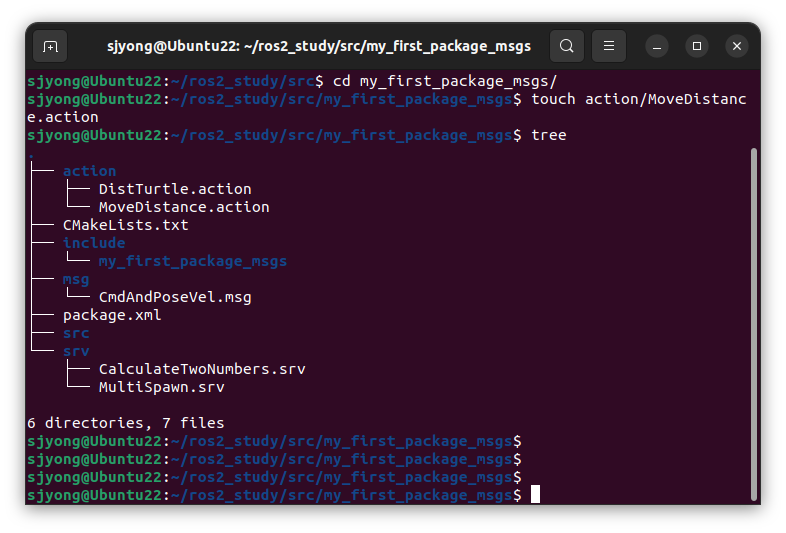
내용:
float32 target_distance
---
bool success
string message
---
float32 current_distance
float32 progress
구성은 다음과 같습니다.
| Goal | 클라이언트가 서버에 요청하는 목표 |
| Result | 서버가 작업 완료 후 반환하는 결과 |
| Feedback | 서버가 작업 중간에 계속 보내는 진행 상태 |
이 예제에서는 클라이언트가 target_distance를 보내면, 서버가 현재 이동 거리와 진행률을 feedback으로 보내고, 완료되면 result를 반환합니다.
4. my_first_package_msgs 설정
1) package.xml 수정
my_first_package_msgs/package.xml에 다음 의존성을 추가합니다.
<buildtool_depend>ament_cmake</buildtool_depend>

<build_depend>rosidl_default_generators</build_depend>
<exec_depend>rosidl_default_runtime</exec_depend>

<member_of_group>rosidl_interface_packages</member_of_group>
최소 예시는 다음과 같습니다.
<?xml version="1.0"?>
<package format="3">
  <name>my_first_package_msgs</name>
  <version>0.0.0</version>
  <description>Custom action interfaces for practice</description>
  <maintainer email="user@example.com">user</maintainer>
  <license>Apache-2.0</license>

  <buildtool_depend>ament_cmake</buildtool_depend>

  <build_depend>rosidl_default_generators</build_depend>
  <exec_depend>rosidl_default_runtime</exec_depend>

  <member_of_group>rosidl_interface_packages</member_of_group>

  <export>
    <build_type>ament_cmake</build_type>
  </export>
</package>
<build_type>ament_cmake</build_type>는 빌드 타입을 명확히 지정하기 위해 넣는 것이 좋습니다.
2) CMakeLists.txt 수정
my_first_package_msgs/CMakeLists.txt를 다음처럼 수정합니다.
cmake_minimum_required(VERSION 3.8)
project(my_first_package_msgs)

if(CMAKE_COMPILER_IS_GNUCXX OR CMAKE_CXX_COMPILER_ID MATCHES "Clang")
  add_compile_options(-Wall -Wextra -Wpedantic)
endif()

find_package(ament_cmake REQUIRED)
find_package(rosidl_default_generators REQUIRED)

rosidl_generate_interfaces(${PROJECT_NAME}
  "action/MoveDistance.action"
)

ament_package()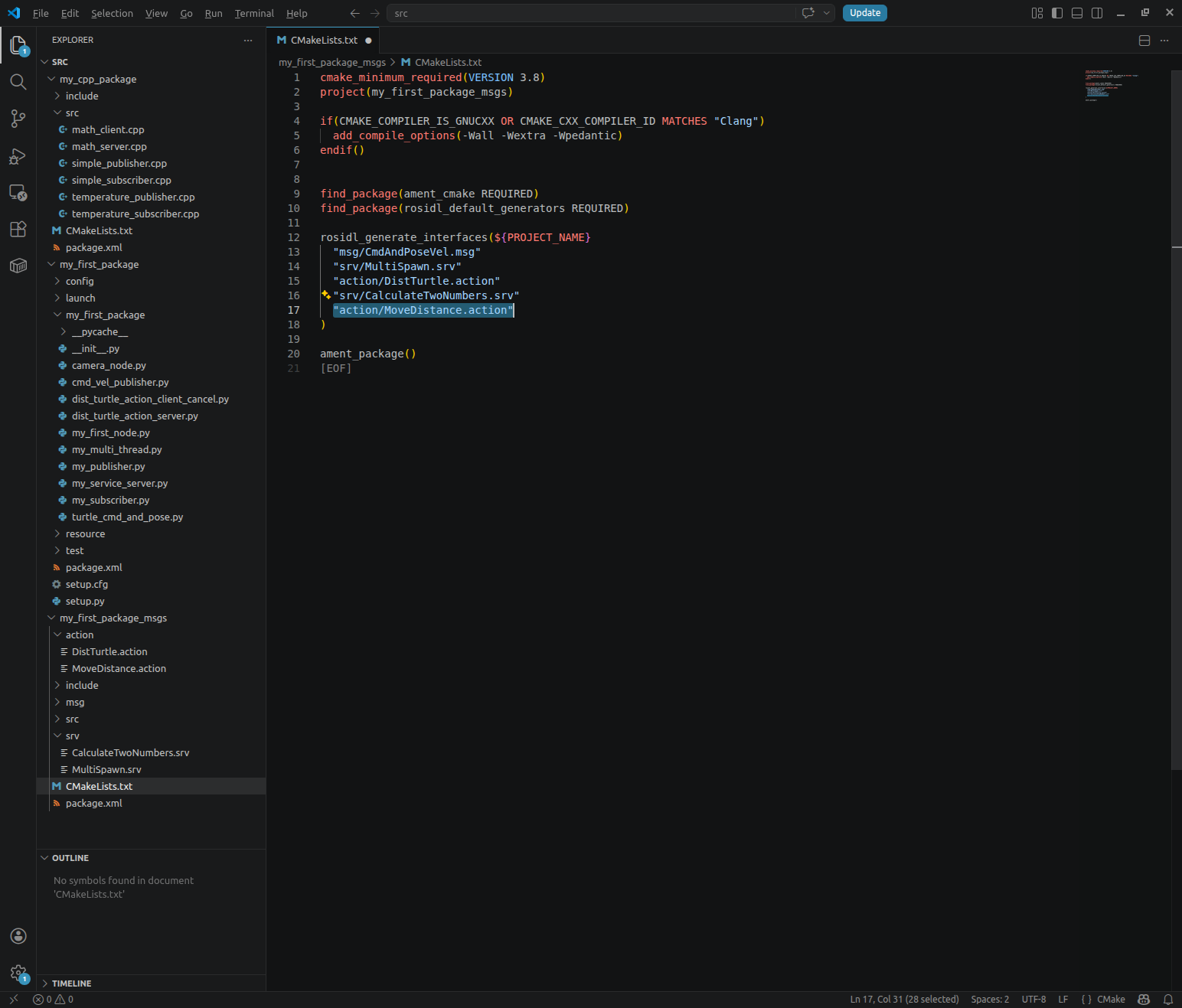
5. Action Server 작성
파일 생성:
cd ~/ros2_ws/src/my_cpp_package
touch src/move_distance_server.cpp
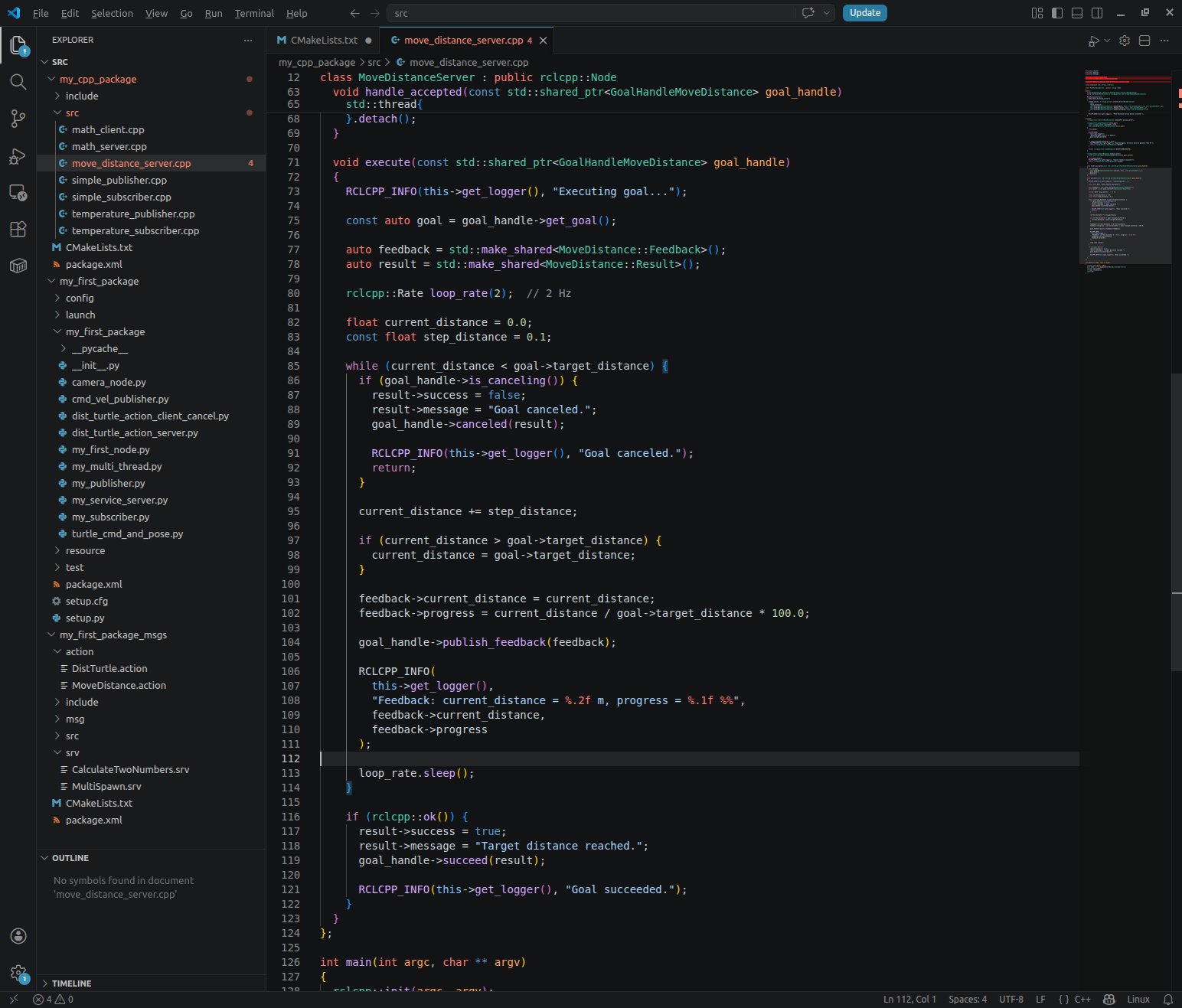
내용:
#include <chrono>
#include <memory>
#include <thread>

#include "rclcpp/rclcpp.hpp"
#include "rclcpp_action/rclcpp_action.hpp"

#include "my_first_package_msgs/action/move_distance.hpp"

using namespace std::chrono_literals;

class MoveDistanceServer : public rclcpp::Node
{
public:
  using MoveDistance = my_first_package_msgs::action::MoveDistance;
  using GoalHandleMoveDistance = rclcpp_action::ServerGoalHandle<MoveDistance>;

  MoveDistanceServer()
  : Node("move_distance_server")
  {
    action_server_ = rclcpp_action::create_server<MoveDistance>(
      this,
      "move_distance",
      std::bind(&MoveDistanceServer::handle_goal, this, std::placeholders::_1, std::placeholders::_2),
      std::bind(&MoveDistanceServer::handle_cancel, this, std::placeholders::_1),
      std::bind(&MoveDistanceServer::handle_accepted, this, std::placeholders::_1)
    );

    RCLCPP_INFO(this->get_logger(), "Move Distance Action Server started.");
  }

private:
  rclcpp_action::Server<MoveDistance>::SharedPtr action_server_;

  rclcpp_action::GoalResponse handle_goal(
    const rclcpp_action::GoalUUID & uuid,
    std::shared_ptr<const MoveDistance::Goal> goal)
  {
    (void)uuid;

    RCLCPP_INFO(
      this->get_logger(),
      "Received goal: move %.2f meters",
      goal->target_distance
    );

    if (goal->target_distance <= 0.0) {
      RCLCPP_WARN(this->get_logger(), "Rejected goal. Distance must be greater than 0.");
      return rclcpp_action::GoalResponse::REJECT;
    }

    return rclcpp_action::GoalResponse::ACCEPT_AND_EXECUTE;
  }

  rclcpp_action::CancelResponse handle_cancel(
    const std::shared_ptr<GoalHandleMoveDistance> goal_handle)
  {
    (void)goal_handle;
    RCLCPP_INFO(this->get_logger(), "Cancel request received.");
    return rclcpp_action::CancelResponse::ACCEPT;
  }

  void handle_accepted(const std::shared_ptr<GoalHandleMoveDistance> goal_handle)
  {
    std::thread{
      std::bind(&MoveDistanceServer::execute, this, std::placeholders::_1),
      goal_handle
    }.detach();
  }

  void execute(const std::shared_ptr<GoalHandleMoveDistance> goal_handle)
  {
    RCLCPP_INFO(this->get_logger(), "Executing goal...");

    const auto goal = goal_handle->get_goal();

    auto feedback = std::make_shared<MoveDistance::Feedback>();
    auto result = std::make_shared<MoveDistance::Result>();

    rclcpp::Rate loop_rate(2);  // 2 Hz

    float current_distance = 0.0;
    const float step_distance = 0.1;

    while (current_distance < goal->target_distance) {
      if (goal_handle->is_canceling()) {
        result->success = false;
        result->message = "Goal canceled.";
        goal_handle->canceled(result);

        RCLCPP_INFO(this->get_logger(), "Goal canceled.");
        return;
      }

      current_distance += step_distance;

      if (current_distance > goal->target_distance) {
        current_distance = goal->target_distance;
      }

      feedback->current_distance = current_distance;
      feedback->progress = current_distance / goal->target_distance * 100.0;

      goal_handle->publish_feedback(feedback);

      RCLCPP_INFO(
        this->get_logger(),
        "Feedback: current_distance = %.2f m, progress = %.1f %%",
        feedback->current_distance,
        feedback->progress
      );

      loop_rate.sleep();
    }

    if (rclcpp::ok()) {
      result->success = true;
      result->message = "Target distance reached.";
      goal_handle->succeed(result);

      RCLCPP_INFO(this->get_logger(), "Goal succeeded.");
    }
  }
};

int main(int argc, char ** argv)
{
  rclcpp::init(argc, argv);
  auto node = std::make_shared<MoveDistanceServer>();
  rclcpp::spin(node);
  rclcpp::shutdown();
  return 0;
}
6. 액션 서버 분석
1) 전체 역할
이 노드는 move_distance_server라는 이름의 ROS 2 노드입니다.
클라이언트가 Action Goal로 이동 목표 거리 값을 보내면 서버는 다음 흐름으로 동작합니다.
- 목표 거리 요청을 받음
- 목표 거리가 유효한지 검사
- 유효하면 Goal을 수락
- 별도 스레드에서 이동 동작 실행
- 실행 중 현재 이동 거리와 진행률을 Feedback으로 전송
- 취소 요청이 들어오면 작업 중단
- 목표 거리까지 도달하면 성공 Result 반환
즉, 이 코드는 실제 모터를 제어하지는 않지만, 로봇이 일정 거리만큼 이동하는 Action Server의 기본 구조를 학습하기에 적합한 예제입니다.
2) 헤더 파일 포함
#include <chrono>
#include <memory>
#include <thread>
표준 C++ 라이브러리입니다.
#include <chrono>
시간 관련 기능을 사용하기 위한 헤더입니다.
이 코드에서는 2Hz 주기로 반복 실행하기 위해 rclcpp::Rate를 사용하고 있으며, 500ms, 1s 같은 시간 표현을 사용할 수 있도록 준비되어 있습니다.
#include <memory>
std::shared_ptr를 사용하기 위한 헤더입니다.
ROS 2에서는 노드, 메시지, Goal Handle 등을 포인터로 관리하는 경우가 많기 때문에 자주 사용됩니다.
#include <thread>
별도의 스레드를 생성하기 위한 헤더입니다.
Action Server는 Goal을 수락한 뒤 실제 실행 작업을 별도 스레드에서 처리합니다.
#include "rclcpp/rclcpp.hpp"
#include "rclcpp_action/rclcpp_action.hpp"
ROS 2 C++ 클라이언트 라이브러리입니다.
#include "rclcpp/rclcpp.hpp"
ROS 2 노드 생성, 로그 출력, spin 처리 등을 위해 사용합니다.
#include "rclcpp_action/rclcpp_action.hpp"
ROS 2 Action Server를 만들기 위해 필요한 헤더입니다.
#include "my_first_package_msgs/action/move_distance.hpp"
직접 정의한 Action 인터페이스를 포함합니다.
예를 들어 MoveDistance.action 파일이 다음과 같은 구조라면,
float32 target_distance
---
bool success
string message
---
float32 current_distance
float32 progress
이 헤더를 통해 C++ 코드에서 다음 타입들을 사용할 수 있습니다.
MoveDistance::Goal
MoveDistance::Result
MoveDistance::Feedback
3) 네임스페이스 사용
using namespace std::chrono_literals;
시간 단위를 간단하게 표현하기 위한 선언입니다.
예를 들어 다음과 같은 표현을 사용할 수 있습니다.
500ms
1s
2s
현재 코드에서는 직접적으로 500ms 같은 표현을 사용하지는 않지만, ROS 2 예제 코드에서 자주 포함되는 형태입니다.
4) 클래스 선언
class MoveDistanceServer : public rclcpp::Node
MoveDistanceServer 클래스는 ROS 2 노드 클래스입니다.
public rclcpp::Node
를 상속받았기 때문에 이 클래스는 ROS 2 노드로 동작할 수 있습니다.
즉, 이 클래스 내부에서 다음과 같은 기능을 사용할 수 있습니다.
this->get_logger()
this->get_clock()
this->create_publisher()
this->create_subscription()
이 코드에서는 주로 Action Server 생성과 로그 출력을 사용합니다.
5) Action 타입 정의
using MoveDistance = my_first_package_msgs::action::MoveDistance;
using GoalHandleMoveDistance = rclcpp_action::ServerGoalHandle<MoveDistance>;
코드를 짧고 읽기 쉽게 만들기 위한 타입 별칭입니다.
a. MoveDistance
using MoveDistance = my_first_package_msgs::action::MoveDistance;
MoveDistance는 사용자가 정의한 Action 타입입니다.
원래는 아래처럼 긴 이름을 사용해야 합니다.
my_first_package_msgs::action::MoveDistance
하지만 using을 사용하면 이후 코드에서는 간단히 다음처럼 사용할 수 있습니다.
MoveDistance::Goal
MoveDistance::Feedback
MoveDistance::Result
b. GoalHandleMoveDistance
using GoalHandleMoveDistance = rclcpp_action::ServerGoalHandle<MoveDistance>;
Goal Handle 타입입니다.
Action Server는 단순히 Goal 메시지만 받는 것이 아니라, 해당 Goal의 상태를 관리해야 합니다.
Goal Handle을 통해 다음과 같은 작업을 할 수 있습니다.
goal_handle->get_goal();
goal_handle->publish_feedback(feedback);
goal_handle->succeed(result);
goal_handle->canceled(result);
goal_handle->is_canceling();
즉, Goal Handle은 현재 실행 중인 Action 요청을 제어하는 객체라고 보면 됩니다.
6) 생성자
MoveDistanceServer()
: Node("move_distance_server")
생성자입니다.
Node("move_distance_server")를 통해 ROS 2 노드 이름을 move_distance_server로 설정합니다.
실행 후 터미널에서 노드 목록을 확인하면 다음과 같이 보일 수 있습니다.
ros2 node list
출력 예:
/move_distance_server7) Action Server 생성
action_server_ = rclcpp_action::create_server<MoveDistance>(
  this,
  "move_distance",
  std::bind(&MoveDistanceServer::handle_goal, this, std::placeholders::_1, std::placeholders::_2),
  std::bind(&MoveDistanceServer::handle_cancel, this, std::placeholders::_1),
  std::bind(&MoveDistanceServer::handle_accepted, this, std::placeholders::_1)
);
이 부분이 Action Server를 생성하는 핵심 코드입니다.
a. Action 타입 지정
rclcpp_action::create_server<MoveDistance>
MoveDistance 타입의 Action Server를 생성합니다.
즉, 이 서버는 다음 Action 인터페이스를 기준으로 동작합니다.
my_first_package_msgs::action::MoveDistanceb. 노드 지정
this
현재 클래스가 ROS 2 노드이므로, 현재 노드에 Action Server를 생성한다는 의미입니다.
c. Action 이름 지정
"move_distance"
Action 이름입니다.
클라이언트는 이 이름으로 서버에 Goal을 보냅니다.
터미널에서 Action 목록을 확인하면 다음처럼 표시될 수 있습니다.
ros2 action list
출력 예:
/move_distance8) Action Server 콜백 함수 3개
Action Server에는 크게 3개의 콜백 함수가 필요합니다.
handle_goal
handle_cancel
handle_accepted
각각의 역할은 다음과 같습니다.
| handle_goal() | 클라이언트가 보낸 Goal을 받을지 거절할지 결정 |
| handle_cancel() | 클라이언트의 취소 요청을 받을지 결정 |
| handle_accepted() | Goal이 수락된 후 실제 실행 함수 호출 |
9) 서버 시작 로그
RCLCPP_INFO(this->get_logger(), "Move Distance Action Server started.");
노드가 실행되면 터미널에 로그를 출력합니다.
출력 예:
[INFO] [move_distance_server]: Move Distance Action Server started.10) Action Server 멤버 변수
rclcpp_action::Server<MoveDistance>::SharedPtr action_server_;
Action Server 객체를 저장하는 멤버 변수입니다.
SharedPtr로 선언되어 있으며, 노드가 살아있는 동안 Action Server 객체도 유지됩니다.
이 변수가 없으면 생성된 Action Server가 유지되지 못하고 소멸될 수 있습니다.
11) Goal 요청 처리 함수
rclcpp_action::GoalResponse handle_goal(
  const rclcpp_action::GoalUUID & uuid,
  std::shared_ptr<const MoveDistance::Goal> goal)
클라이언트가 Goal을 보냈을 때 호출되는 함수입니다.
a. UUID
const rclcpp_action::GoalUUID & uuid
각 Goal 요청을 구분하기 위한 고유 ID입니다.
현재 코드에서는 UUID를 직접 사용하지 않기 때문에 다음과 같이 처리했습니다.
(void)uuid;
이 코드는 “사용하지 않는 변수” 경고를 없애기 위한 방식입니다.
b. Goal 데이터
std::shared_ptr<const MoveDistance::Goal> goal
클라이언트가 보낸 Goal 데이터입니다.
이 예제에서는 다음 값을 사용합니다.
goal->target_distance
즉, 목표 이동 거리입니다.
c. Goal 수신 로그
RCLCPP_INFO(
  this->get_logger(),
  "Received goal: move %.2f meters",
  goal->target_distance
);
클라이언트가 요청한 목표 거리를 로그로 출력합니다.
예를 들어 클라이언트가 3.0을 보내면 다음처럼 출력됩니다.
Received goal: move 3.00 meters
d. Goal 유효성 검사
if (goal->target_distance <= 0.0) {
  RCLCPP_WARN(this->get_logger(), "Rejected goal. Distance must be greater than 0.");
  return rclcpp_action::GoalResponse::REJECT;
}
목표 거리가 0 이하이면 Goal을 거절합니다.
거리 이동 명령에서 목표 거리가 0m 또는 음수이면 의미가 없기 때문입니다.
예를 들어 다음 값들은 거절됩니다.
0.0
-1.0
-5.5
거절될 경우 서버는 다음 응답을 반환합니다.
rclcpp_action::GoalResponse::REJECTe. Goal 수락
return rclcpp_action::GoalResponse::ACCEPT_AND_EXECUTE;
목표 거리가 양수이면 Goal을 수락하고 바로 실행합니다.
ACCEPT_AND_EXECUTE는 말 그대로 다음 의미입니다.
Goal을 수락하고 실행 단계로 넘긴다.12) Cancel 요청 처리 함수
rclcpp_action::CancelResponse handle_cancel(
  const std::shared_ptr<GoalHandleMoveDistance> goal_handle)
클라이언트가 실행 중인 Action을 취소 요청했을 때 호출됩니다.
(void)goal_handle;
현재 코드에서는 취소 요청을 보낸 Goal Handle 자체를 직접 사용하지 않습니다.
그래서 경고 방지를 위해 (void)goal_handle;을 사용했습니다.
RCLCPP_INFO(this->get_logger(), "Cancel request received.");
취소 요청이 들어왔다는 로그를 출력합니다.
return rclcpp_action::CancelResponse::ACCEPT;
취소 요청을 수락합니다.
즉, 클라이언트가 취소를 요청하면 서버는 취소를 허용합니다.
13) Goal 수락 후 처리 함수
void handle_accepted(const std::shared_ptr<GoalHandleMoveDistance> goal_handle)
Goal이 수락된 후 호출되는 함수입니다.
이 함수에서는 실제 작업을 바로 실행하지 않고, 별도 스레드를 생성해서 실행합니다.
std::thread{
  std::bind(&MoveDistanceServer::execute, this, std::placeholders::_1),
  goal_handle
}.detach();
이 부분은 새로운 스레드에서 execute() 함수를 실행합니다.
a. 왜 별도 스레드를 사용하는가?
Action 실행 함수는 시간이 오래 걸릴 수 있습니다.
예를 들어 로봇이 10m 이동해야 한다면 몇 초 이상 걸릴 수 있습니다.
만약 execute() 함수를 메인 스레드에서 직접 실행하면, ROS 2 노드가 다른 요청을 처리하지 못할 수 있습니다.
그래서 별도 스레드에서 실행합니다.
b. detach()
.detach();
생성한 스레드를 독립적으로 실행합니다.
즉, 메인 스레드는 기다리지 않고 계속 rclcpp::spin() 상태를 유지합니다.
다만 실무 코드에서는 detach() 사용 시 주의가 필요합니다.
노드가 종료될 때 스레드가 아직 실행 중이면 객체 수명 문제가 생길 수 있기 때문입니다.
학습용 예제에서는 구조를 단순하게 보여주기 위해 많이 사용합니다.
실무형 코드:
std::thread execute_thread_;처럼 스레드를 클래스 멤버로 가지고 있다가, 노드가 종료될 때 join()으로 정상 종료를 기다립니다.
예시:
class MoveDistanceServer : public rclcpp::Node
{
public:
  MoveDistanceServer()
  : Node("move_distance_server")
  {
    action_server_ = rclcpp_action::create_server<MoveDistance>(
      this,
      "move_distance",
      std::bind(&MoveDistanceServer::handle_goal, this, std::placeholders::_1, std::placeholders::_2),
      std::bind(&MoveDistanceServer::handle_cancel, this, std::placeholders::_1),
      std::bind(&MoveDistanceServer::handle_accepted, this, std::placeholders::_1)
    );
  }

  ~MoveDistanceServer()
  {
    stop_requested_ = true;

    if (execute_thread_.joinable()) {
      execute_thread_.join();
    }
  }

private:
  std::thread execute_thread_;
  std::atomic_bool stop_requested_{false};

  void handle_accepted(const std::shared_ptr<GoalHandleMoveDistance> goal_handle)
  {
    execute_thread_ = std::thread(
      std::bind(&MoveDistanceServer::execute, this, std::placeholders::_1),
      goal_handle
    );
  }

  void execute(const std::shared_ptr<GoalHandleMoveDistance> goal_handle)
  {
    while (rclcpp::ok() && !stop_requested_) {
      // 작업 수행
    }
  }
};
중요한 것은 아래의 코드입니다.
if (execute_thread_.joinable()) {
  execute_thread_.join();
}
join()은 스레드가 끝날 때까지 기다립니다.
즉, 노드 객체가 파괴되기 전에 실행 중인 작업을 안전하게 마무리합니다.
14) 실제 Action 실행 함수
void execute(const std::shared_ptr<GoalHandleMoveDistance> goal_handle)
Goal이 수락된 뒤 실제 이동 작업을 수행하는 함수입니다.
이 함수에서 Feedback을 보내고, 최종 Result를 반환합니다.
a. 실행 시작 로그
RCLCPP_INFO(this->get_logger(), "Executing goal...");
Action 실행이 시작되었음을 출력합니다.
b. Goal 데이터 가져오기
const auto goal = goal_handle->get_goal();
Goal Handle에서 클라이언트가 보낸 Goal 데이터를 가져옵니다.
이후 목표 거리는 다음처럼 사용합니다.
goal->target_distance
c. Feedback과 Result 객체 생성
auto feedback = std::make_shared<MoveDistance::Feedback>();
auto result = std::make_shared<MoveDistance::Result>();
Action에서 사용하는 Feedback과 Result 객체를 생성합니다.
Feedback
Feedback은 실행 중간 상태를 클라이언트에게 계속 알려주는 메시지입니다.
이 예제에서는 다음 정보를 전달합니다.
feedback->current_distance
feedback->progress| current_distance | 현재까지 이동한 거리 |
| progress | 전체 목표 거리 대비 진행률 |
Result
Result는 Action이 끝났을 때 최종 결과를 클라이언트에게 전달하는 메시지입니다.
이 예제에서는 다음 정보를 전달합니다.
result->success
result->message| success | 성공 여부 |
| message | 결과 메시지 |
d. 반복 주기 설정
rclcpp::Rate loop_rate(2);
반복문 실행 주기를 2Hz로 설정합니다.
2Hz는 1초에 2번 실행한다는 의미입니다.
즉, 반복문은 약 0.5초마다 한 번씩 실행됩니다.
e. 이동 거리 변수
float current_distance = 0.0;
const float step_distance = 0.1;
현재 이동 거리와 한 번에 증가할 이동 거리입니다.
float current_distance = 0.0;
현재까지 이동한 거리입니다.
처음에는 0m에서 시작합니다.
const float step_distance = 0.1;
반복문 한 번마다 0.1m씩 이동했다고 가정합니다.
현재 코드에서는 실제 센서값이나 모터 제어값을 사용하지 않고, 단순히 시뮬레이션 방식으로 거리를 증가시킵니다.
15) 이동 실행 반복문
while (current_distance < goal->target_distance)
현재 이동 거리가 목표 거리보다 작을 동안 반복합니다.
예를 들어 목표 거리가 1.0m라면 다음처럼 증가합니다.
0.1m
0.2m
0.3m
...
1.0m
16) 취소 요청 확인
if (goal_handle->is_canceling()) {
  result->success = false;
  result->message = "Goal canceled.";
  goal_handle->canceled(result);

  RCLCPP_INFO(this->get_logger(), "Goal canceled.");
  return;
}
반복문 실행 중 클라이언트가 취소 요청을 보냈는지 확인합니다.
a. is_canceling()
goal_handle->is_canceling()
현재 Goal이 취소 요청 상태인지 확인합니다.
취소 요청이 들어오면 true를 반환합니다.
b. 취소 Result 설정
result->success = false;
result->message = "Goal canceled.";
취소되었으므로 성공 여부를 false로 설정합니다.
c. Goal 상태를 canceled로 변경
goal_handle->canceled(result);
Action 상태를 취소 완료 상태로 변경하고, Result를 클라이언트에게 전달합니다.
d. 함수 종료
return;
취소된 경우 더 이상 이동 작업을 진행하지 않고 execute() 함수를 종료합니다.
17) 현재 거리 증가
current_distance += step_distance;
현재 이동 거리를 0.1m 증가시킵니다.
예를 들어 현재 거리가 0.4m라면 다음 반복에서 0.5m가 됩니다.
18) 목표 거리 초과 방지
if (current_distance > goal->target_distance) {
  current_distance = goal->target_distance;
}
마지막 반복에서 현재 거리가 목표 거리를 초과할 수 있습니다.
예를 들어 목표 거리가 1.05m이고, 0.1m씩 증가하면 다음처럼 됩니다.
0.9
1.0
1.1
이 경우 1.1m는 목표 거리보다 크기 때문에 정확히 목표 거리로 보정합니다.
current_distance = goal->target_distance;
그래서 최종 Feedback이 목표 거리를 초과하지 않게 됩니다.
19) Feedback 값 설정
feedback->current_distance = current_distance;
feedback->progress = current_distance / goal->target_distance * 100.0;
클라이언트에게 보낼 Feedback 값을 설정합니다.
a. 현재 이동 거리
feedback->current_distance = current_distance;
현재까지 이동한 거리를 Feedback에 저장합니다.
b. 진행률 계산
feedback->progress = current_distance / goal->target_distance * 100.0;
진행률을 백분율로 계산합니다.
예를 들어 목표 거리가 2.0m, 현재 거리가 0.5m라면 다음과 같습니다.
0.5 / 2.0 * 100 = 25%
따라서 Feedback은 다음처럼 됩니다.
current_distance = 0.5
progress = 25.0
20) Feedback 전송
goal_handle->publish_feedback(feedback);
계산한 Feedback을 Action Client에게 전송합니다.
Action Client는 실행 중간에 이 Feedback을 받아서 현재 진행 상태를 확인할 수 있습니다.
예를 들어 클라이언트 쪽에서는 다음과 같은 정보를 받을 수 있습니다.
Current distance: 0.5 m
Progress: 25.0 %
21) Feedback 로그 출력
RCLCPP_INFO(
  this->get_logger(),
  "Feedback: current_distance = %.2f m, progress = %.1f %%",
  feedback->current_distance,
  feedback->progress
);
서버 터미널에도 현재 진행 상태를 출력합니다.
출력 예:
Feedback: current_distance = 0.10 m, progress = 10.0 %
Feedback: current_distance = 0.20 m, progress = 20.0 %
Feedback: current_distance = 0.30 m, progress = 30.0 %
여기서 %%는 실제 % 문자를 출력하기 위한 표현입니다.
C/C++ 형식 문자열에서 %는 포맷 기호로 사용되기 때문에, 문자 % 자체를 출력하려면 %%라고 작성해야 합니다.
22) 반복 주기 대기
loop_rate.sleep();
설정된 주기에 맞춰 대기합니다.
앞에서 다음처럼 설정했기 때문에,
rclcpp::Rate loop_rate(2);
반복문은 약 0.5초마다 한 번씩 실행됩니다.
즉, 이 예제에서는 0.5초마다 0.1m 이동한 것으로 처리됩니다.
계산하면 이동 속도는 다음과 같습니다.
0.1m / 0.5s = 0.2m/s
따라서 목표 거리가 1.0m라면 약 5초 정도 걸립니다.
23) Goal 성공 처리
if (rclcpp::ok()) {
  result->success = true;
  result->message = "Target distance reached.";
  goal_handle->succeed(result);

  RCLCPP_INFO(this->get_logger(), "Goal succeeded.");
}
반복문이 끝났다는 것은 목표 거리에 도달했다는 의미입니다.
a. ROS 상태 확인
if (rclcpp::ok())
ROS 2 시스템이 정상 동작 중인지 확인합니다.
노드가 종료 중이거나 rclcpp::shutdown()이 호출된 상태라면 결과 처리를 하지 않도록 보호합니다.
b. 성공 Result 설정
result->success = true;
result->message = "Target distance reached.";
목표 거리에 도달했으므로 성공 여부를 true로 설정합니다.
결과 메시지는 "Target distance reached."로 설정합니다.
c. Goal 성공 완료 처리
goal_handle->succeed(result);
Action Goal을 성공 상태로 완료합니다.
이때 Result가 클라이언트에게 전달됩니다.
d. 성공 로그 출력
RCLCPP_INFO(this->get_logger(), "Goal succeeded.");
서버 터미널에 Goal이 성공했음을 출력합니다.
24) main 함수
int main(int argc, char ** argv)
{
  rclcpp::init(argc, argv);
  auto node = std::make_shared<MoveDistanceServer>();
  rclcpp::spin(node);
  rclcpp::shutdown();
  return 0;
}
ROS 2 노드를 실행하는 기본 구조입니다.
a. ROS 2 초기화
rclcpp::init(argc, argv);
ROS 2 통신 시스템을 초기화합니다.
ROS 2 노드를 실행하기 전에 반드시 호출해야 합니다.
b. 노드 객체 생성
auto node = std::make_shared<MoveDistanceServer>();
MoveDistanceServer 노드 객체를 생성합니다.
이 시점에 생성자가 실행되고, 내부에서 Action Server가 만들어집니다.
c. 노드 실행
rclcpp::spin(node);
노드를 계속 실행 상태로 유지합니다.
spin()이 실행되어야 Action Goal 요청, Cancel 요청, 기타 콜백 함수들이 처리됩니다.
d. ROS 2 종료
rclcpp::shutdown();
ROS 2 시스템을 종료합니다.
보통 사용자가 Ctrl + C로 노드를 종료하면 spin()이 끝나고 shutdown()이 호출됩니다.
'강좌 > ROS2' 카테고리의 다른 글
| 로봇 개발자를 위한 Python 기초 교육 #3 (0) | 2026.05.25 |
|---|---|
| C++ Service Client 작성 실습 : 모바일 로봇 긴급정지 요청 보내기 (0) | 2026.05.24 |
| TurtleBot3 Waffle 시뮬레이션에서 RViz와 rqt로 카메라 토픽 확인하기 (0) | 2026.05.24 |
| SLAM 기본 개념, Gazebo 기반 SLAM 실행 (0) | 2026.05.24 |
| ROS 2 에서 CMakeLists.txt 이해하기 (0) | 2026.05.24 |