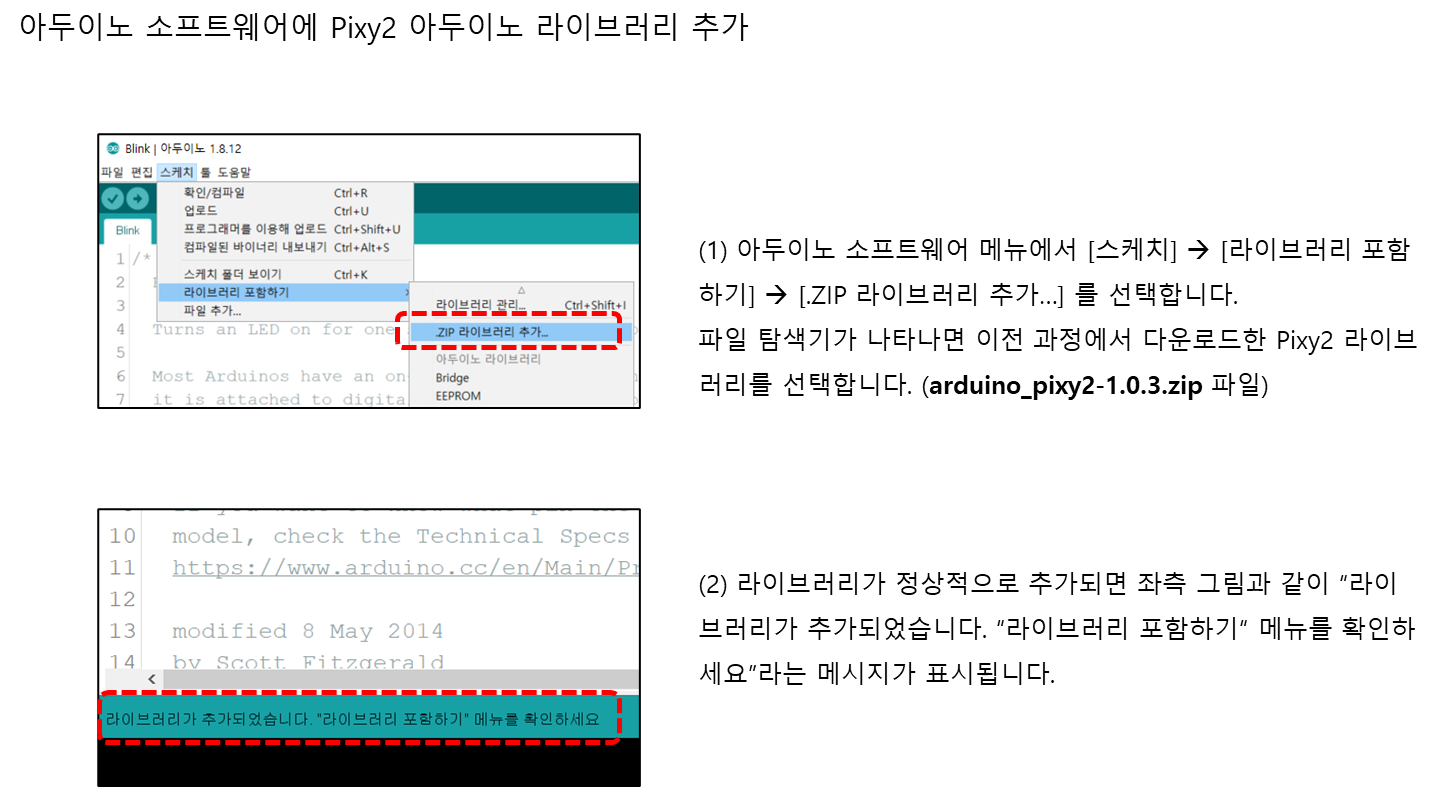
1. Pixy2 아두이노 라이브러리 설치

https://pixycam.com/downloads-pixy2/
Downloads – Pixy2 – PixyCam
Pixy2 Downloads This page contains links to the most recent software/firmware releases for Pixy2. These downloads will not work with the original Pixy! PixyMon v2 PixyMon v2 is the configuration utility for Pixy2 that runs on Windows, MacOS and Linux. Pi
pixycam.com
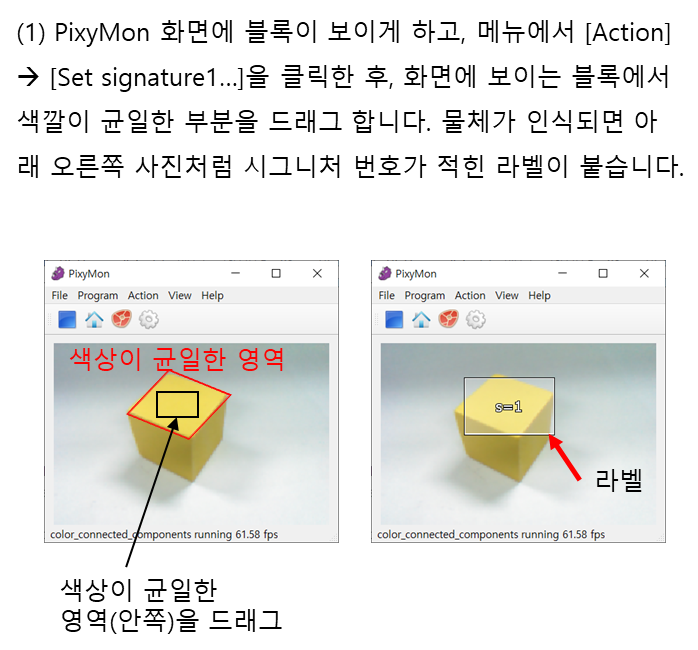
2. PixyMon에서 Pixy2 통신 방식 변경하기

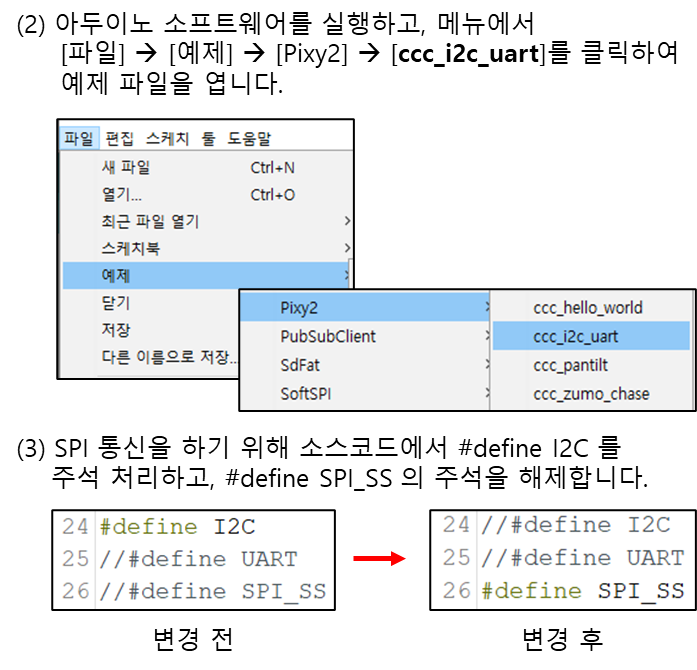
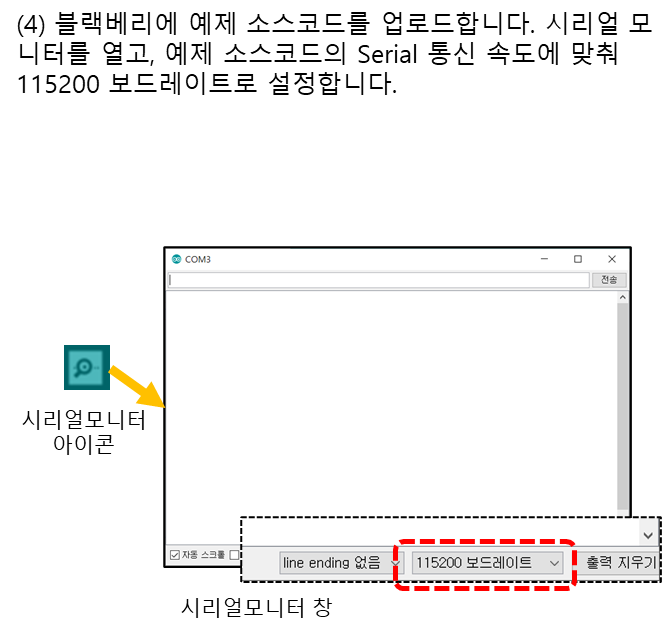
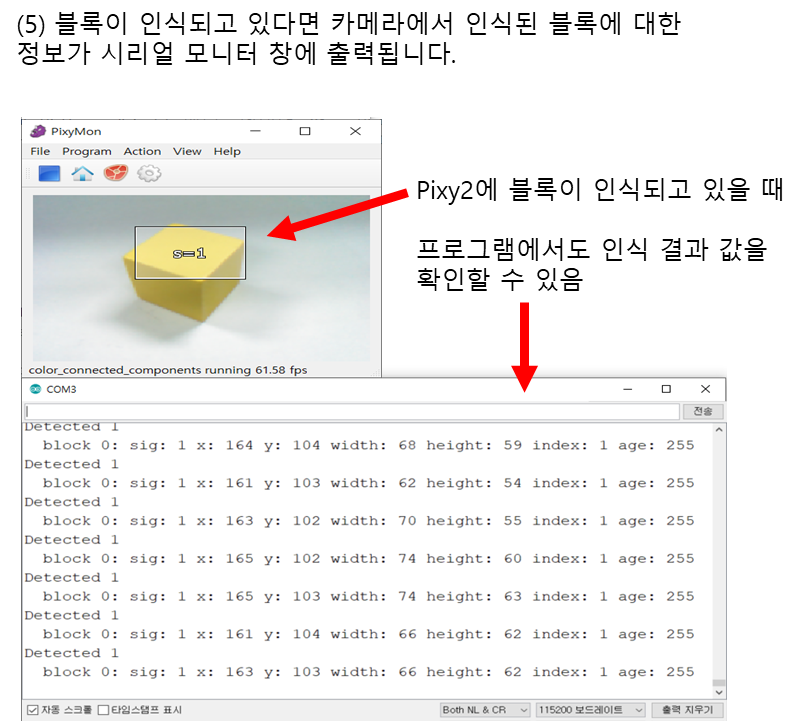
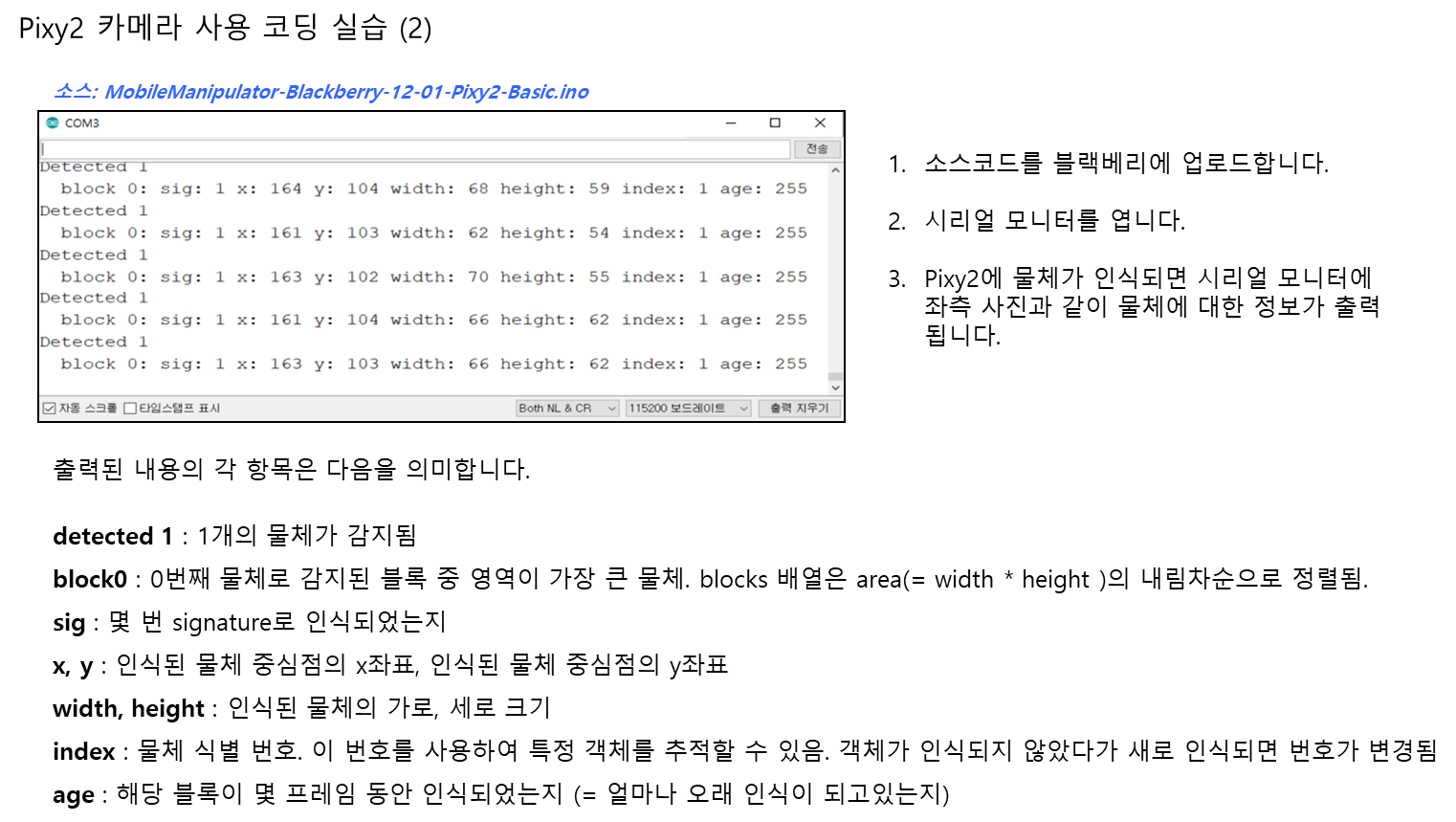
3. Pixy2에 인식된 물체 정보 가져오기
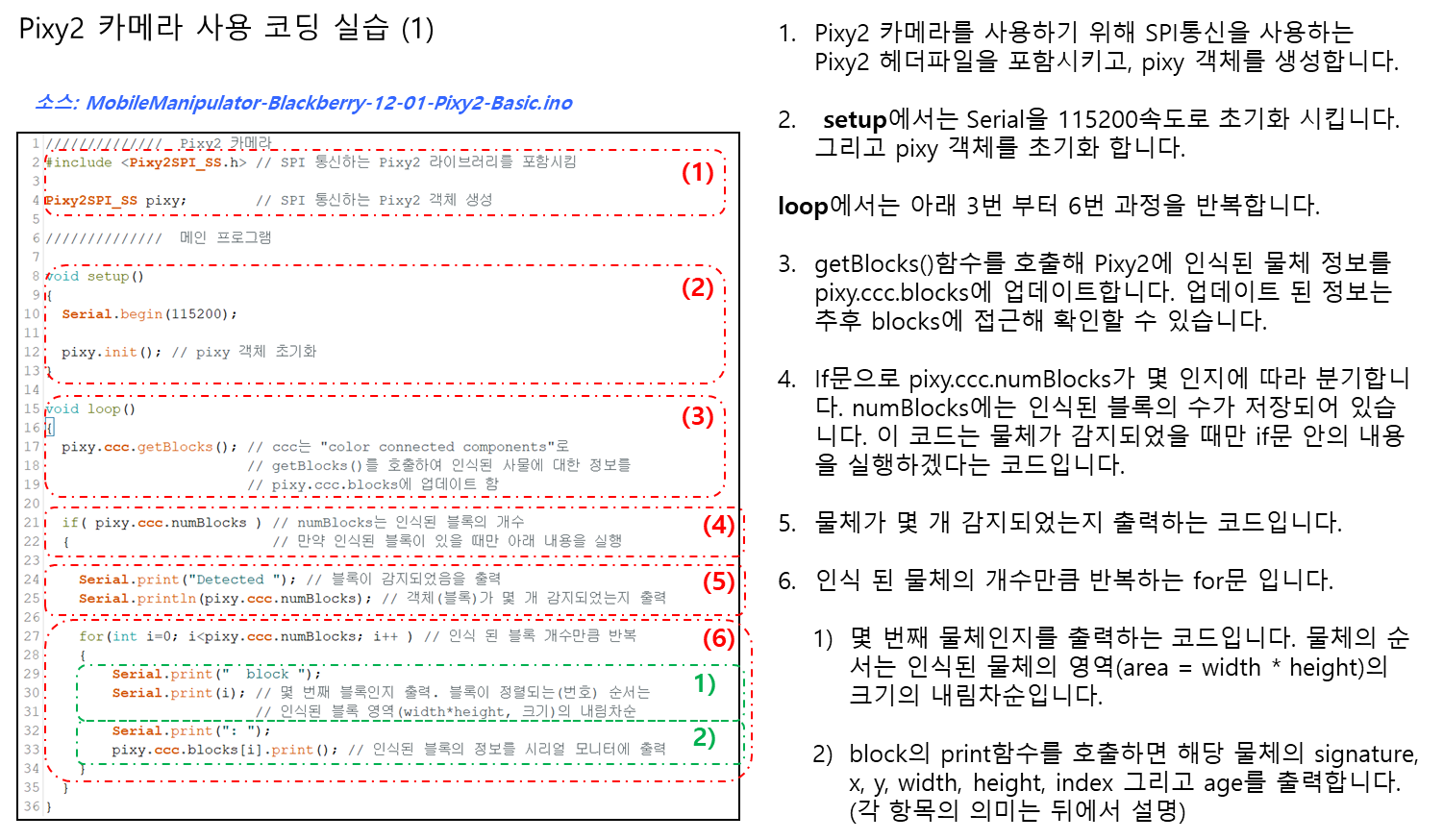
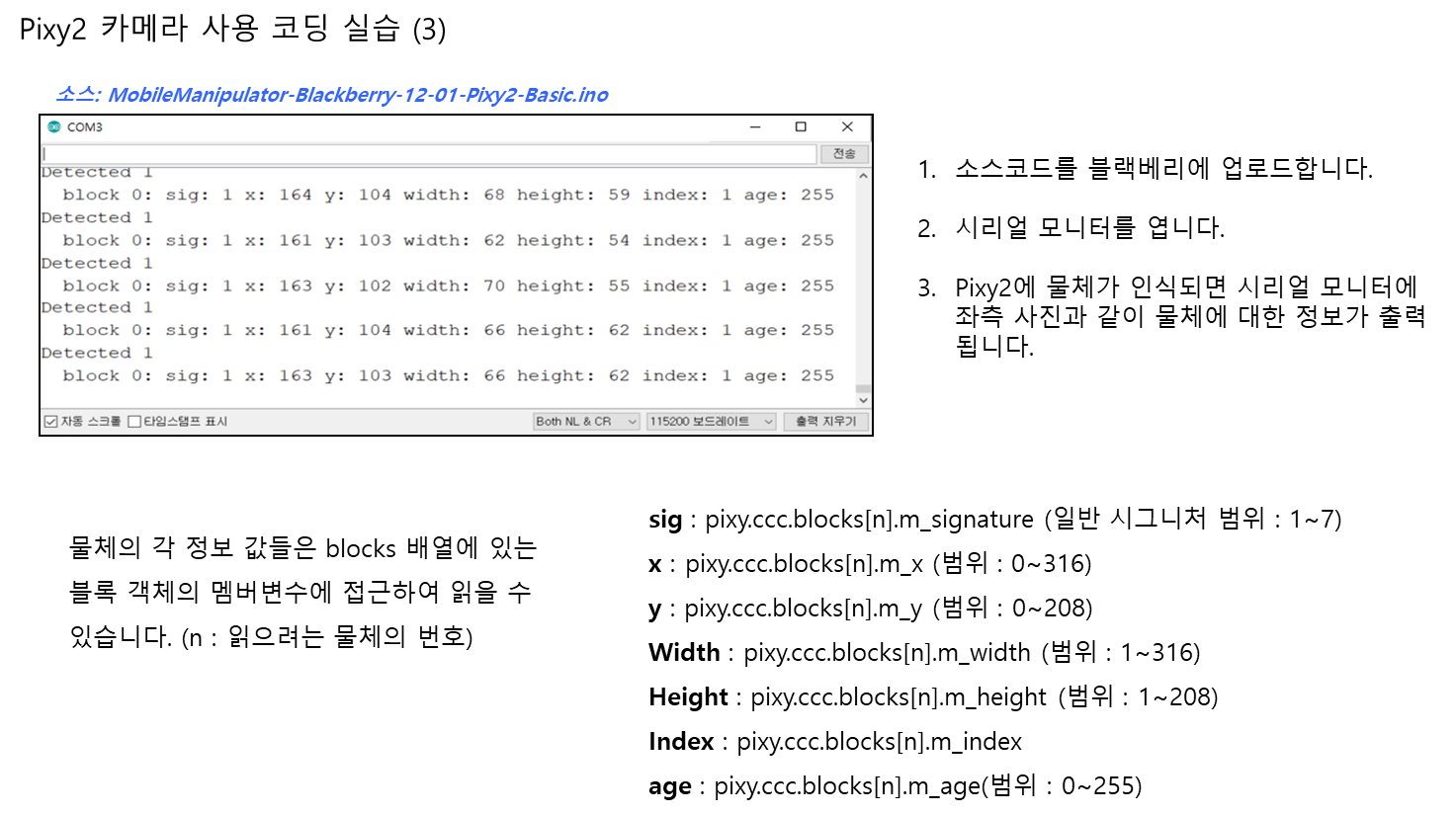
//////////////  Pixy2 카메라
#include <Pixy2SPI_SS.h> // SPI 통신하는 Pixy2 라이브러리를 포함시킴

Pixy2SPI_SS pixy;        // SPI 통신하는 Pixy2 객체 생성

//////////////  메인 프로그램

void setup()
{
  Serial.begin(115200);

  pixy.init(); // pixy 객체 초기화
}

void loop()
{
  pixy.ccc.getBlocks(); // ccc는 "color connected components"로
                        // getBlocks()를 호출하여 인식된 사물에 대한 정보를
                        // pixy.ccc.blocks에 업데이트 함

  if( pixy.ccc.numBlocks ) // numBlocks는 인식된 블록의 개수
  {                        // 만약 인식된 블록이 있을 때만 아래 내용을 실행

    Serial.print("Detected "); // 블록이 감지되었음을 출력
    Serial.println(pixy.ccc.numBlocks); // 객체(블록)가 몇 개 감지되었는지 출력

    for(int i=0; i<pixy.ccc.numBlocks; i++ ) // 인식 된 블록 개수만큼 반복
    {
        Serial.print("  block ");
        Serial.print(i); // 몇 번째 블록인지 출력. 블록이 정렬되는(번호) 순서는
                         // 인식된 블록 영역(width*height, 크기)의 내림차순
        Serial.print(": ");
        pixy.ccc.blocks[i].print(); // 인식된 블록의 정보를 시리얼 모니터에 출력
    }
  }
}
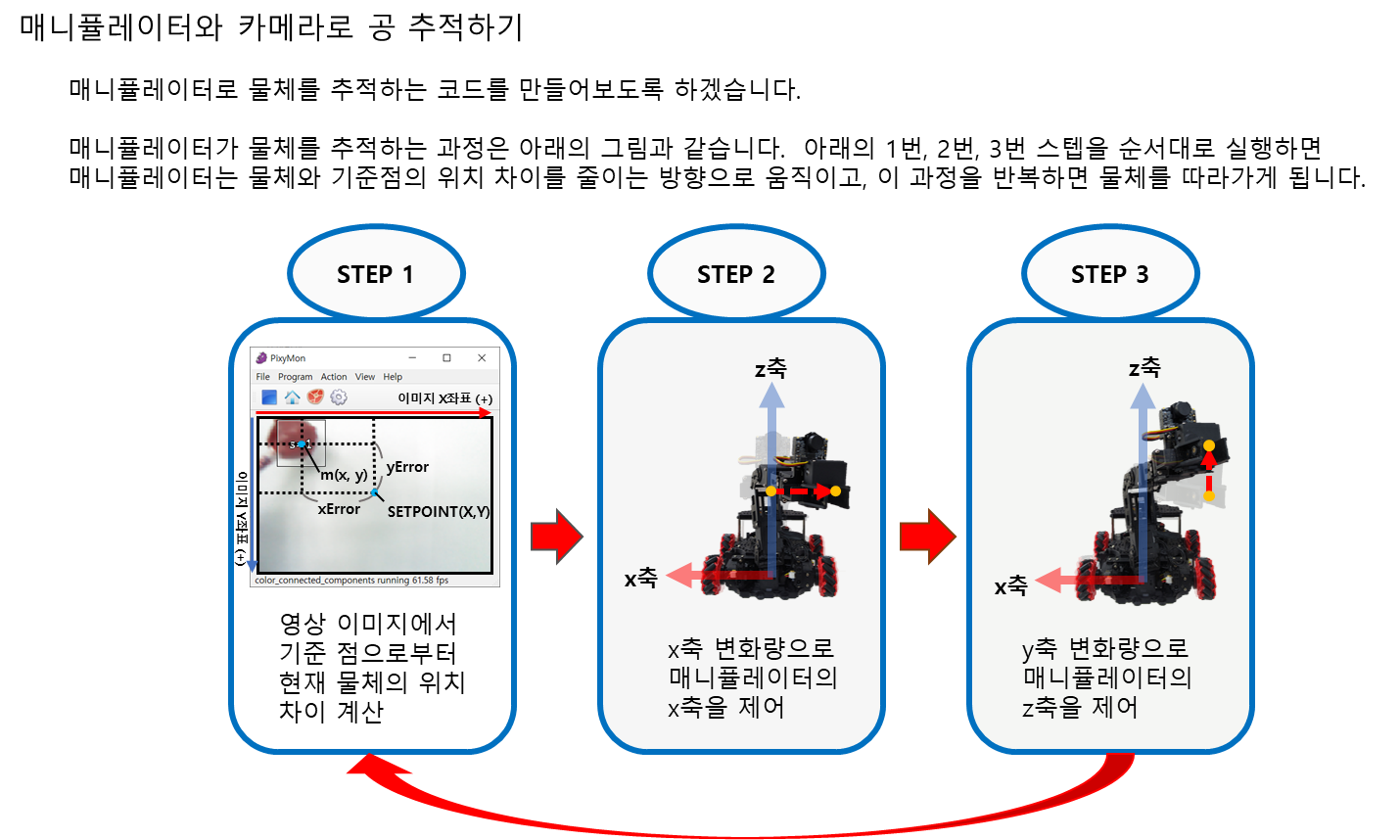
4. 매니퓰레이터로 공 따라가기
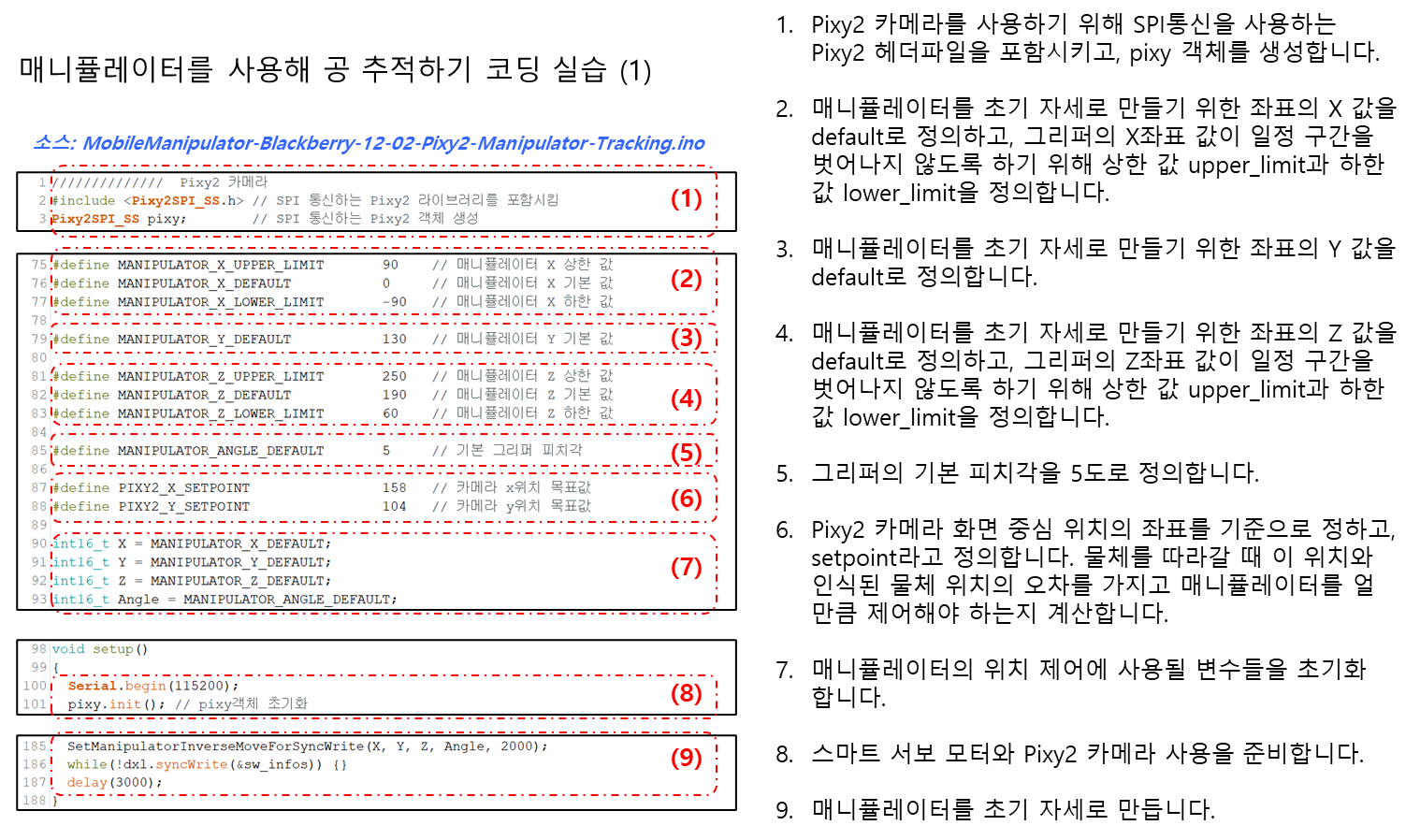


//////////////  Pixy2 카메라
#include <Pixy2SPI_SS.h> // SPI 통신하는 Pixy2 라이브러리를 포함시킴
Pixy2SPI_SS pixy;        // SPI 통신하는 Pixy2 객체 생성

//////////////  모터 구동 관련 선언
#include <Dynamixel2Arduino.h>

#define DXL_SERIAL   Serial1
const int DXL_DIR_PIN = 2; // DIR PIN
const float DXL_PROTOCOL_VERSION = 2.0;

Dynamixel2Arduino dxl(DXL_SERIAL, DXL_DIR_PIN);

// 컨트롤 테이블 아이템의 이름을 사용하기 위해 이 네임스페이스가 필요함
using namespace ControlTableItem;


//////////////  모터 구동용 변수/상수
#define ARM_DXL_ID_1            0x05 // 매니퓰레이터 1번 모터 아이디 (가장 아래)
#define ARM_DXL_ID_2            0x06 // 매니퓰레이터 2번 모터 아이디
#define ARM_DXL_ID_3            0x07 // 매니퓰레이터 3번 모터 아이디
#define ARM_DXL_ID_4            0x08 // 매니퓰레이터 4번 모터 아이디 (가장 위)

#define NORMAL_MODE                 0x00 // drive mode의 방향 모드
#define REVERSE_MODE                0x01

#define VELOCITY_BASED_PROFILE      0x00 // profile configuration
#define TIME_BASED_PROFILE          0x04

#define ARM_DXL_1_POSITION_MIN  0
#define ARM_DXL_1_POSITION_MAX  4095
#define ARM_DXL_2_POSITION_MIN  1024
#define ARM_DXL_2_POSITION_MAX  3474
#define ARM_DXL_3_POSITION_MIN  211
#define ARM_DXL_3_POSITION_MAX  2640
#define ARM_DXL_4_POSITION_MIN  722
#define ARM_DXL_4_POSITION_MAX  3161

#define ARM_DXL_1_OFFSET        0
#define ARM_DXL_2_OFFSET        238
#define ARM_DXL_3_OFFSET        799
#define ARM_DXL_4_OFFSET        0

// FinManipulatorServos 함수에서 찾을 모터 아이디들, 값이 중복 없이 정렬되어있어야 함
const uint8_t ARM_DXL_ID_CNT = 4;
const uint8_t ARM_DXL_IDS[ARM_DXL_ID_CNT] = {ARM_DXL_ID_1,
                                             ARM_DXL_ID_2,
                                             ARM_DXL_ID_3,
                                             ARM_DXL_ID_4};

// sync write 용 상수, 구조체 정의 및 인스턴스화
const uint16_t SW_START_ADDR = 112; // sync write start 주소
const uint16_t SW_DATA_SIZE = 8; // sync write data 길이
typedef struct sw_data{ // 모터에 데이터를 쓰기 위한 구조체 정의
  int32_t profile_velocity;
  int32_t goal_position;
} __attribute__((packed)) sw_data_t;

sw_data_t sw_data[ARM_DXL_ID_CNT]; // 모터 개수만큼 인스턴스 생성
DYNAMIXEL::InfoSyncWriteInst_t sw_infos; // syncwrite 정보 인스턴스 생성
// syncWrite할 모터들 정보 인스턴스를 모터 개수만큼 생성
DYNAMIXEL::XELInfoSyncWrite_t info_xels_sw[ARM_DXL_ID_CNT];


//////////////  매니퓰레이터 계산용 변수/상수
#define pi      3.141592
#define DTR(x)  (x)*(pi/180) // degree to radian
#define RTD(x)  (x)*(180/pi) // radian to degree

const float d = 79.75; // 바닥에서 매니퓰레이터 2번 모터 회전축까지의 거리
const float L1 = 109.21; // 2번과 3번 모터의 회전축간 거리
const float L2 = 86.4; // 3번과 4번 모터의 회전축간 거리
const float L3 = 97.2; // 4번 모터 회전축과 그리퍼 끝부분 사이의 거리

#define MANIPULATOR_X_UPPER_LIMIT       90    // 매니퓰레이터 X 상한 값
#define MANIPULATOR_X_DEFAULT           0     // 매니퓰레이터 X 기본 값
#define MANIPULATOR_X_LOWER_LIMIT       -90   // 매니퓰레이터 X 하한 값

#define MANIPULATOR_Y_DEFAULT           130   // 매니퓰레이터 Y 기본 값

#define MANIPULATOR_Z_UPPER_LIMIT       250   // 매니퓰레이터 Z 상한 값
#define MANIPULATOR_Z_DEFAULT           190   // 매니퓰레이터 Z 기본 값
#define MANIPULATOR_Z_LOWER_LIMIT       60    // 매니퓰레이터 Z 하한 값

#define MANIPULATOR_ANGLE_DEFAULT       5     // 기본 그리퍼 피치각

#define PIXY2_X_SETPOINT                158   // 카메라 x위치 목표값
#define PIXY2_Y_SETPOINT                104   // 카메라 y위치 목표값

int16_t X = MANIPULATOR_X_DEFAULT;
int16_t Y = MANIPULATOR_Y_DEFAULT;
int16_t Z = MANIPULATOR_Z_DEFAULT;
int16_t Angle = MANIPULATOR_ANGLE_DEFAULT;


//////////////  메인 프로그램

void setup()
{
  Serial.begin(115200);
  pixy.init(); // pixy객체 초기화

  dxl.begin(57600);
  dxl.setPortProtocolVersion(DXL_PROTOCOL_VERSION);

  // 모터가 모두 있는지 확인될 때 까지 진행하지 않음
  while(!FindManipulatorServos()) {}

  // 각 모터에 설정
  for (int i = 0 ; i < ARM_DXL_ID_CNT ; i++) {
    // 토크 끄기
    dxl.writeControlTableItem(TORQUE_ENABLE, ARM_DXL_IDS[i], 0);

    // 드라이브 모드 설정
    // 방향은 Reverse Mode, Profile Configuration은 Time-based Profile
    dxl.writeControlTableItem(DRIVE_MODE, ARM_DXL_IDS[i],
                              REVERSE_MODE + TIME_BASED_PROFILE);
    // 오퍼레이팅 모드를 위치 제어 모드로 설정
    dxl.writeControlTableItem(OPERATING_MODE, ARM_DXL_IDS[i], 3);

    switch (ARM_DXL_IDS[i]) { // 모터에 따라 position limit, homing offset 설정
      case ARM_DXL_ID_1:
        dxl.writeControlTableItem(MIN_POSITION_LIMIT,
                                  ARM_DXL_IDS[i], ARM_DXL_1_POSITION_MIN);
        dxl.writeControlTableItem(MAX_POSITION_LIMIT,
                                  ARM_DXL_IDS[i], ARM_DXL_1_POSITION_MAX);
        dxl.writeControlTableItem(HOMING_OFFSET,
                                  ARM_DXL_IDS[i], ARM_DXL_1_OFFSET);
        break;
      case ARM_DXL_ID_2:
        dxl.writeControlTableItem(MIN_POSITION_LIMIT,
                                  ARM_DXL_IDS[i], ARM_DXL_2_POSITION_MIN);
        dxl.writeControlTableItem(MAX_POSITION_LIMIT,
                                  ARM_DXL_IDS[i], ARM_DXL_2_POSITION_MAX);
        dxl.writeControlTableItem(HOMING_OFFSET,
                                  ARM_DXL_IDS[i], ARM_DXL_2_OFFSET);
        break;
      case ARM_DXL_ID_3:
        dxl.writeControlTableItem(MIN_POSITION_LIMIT,
                                  ARM_DXL_IDS[i], ARM_DXL_3_POSITION_MIN);
        dxl.writeControlTableItem(MAX_POSITION_LIMIT,
                                  ARM_DXL_IDS[i], ARM_DXL_3_POSITION_MAX);
        dxl.writeControlTableItem(HOMING_OFFSET,
                                  ARM_DXL_IDS[i], ARM_DXL_3_OFFSET);
        break;
      case ARM_DXL_ID_4:
        dxl.writeControlTableItem(MIN_POSITION_LIMIT,
                                  ARM_DXL_IDS[i], ARM_DXL_4_POSITION_MIN);
        dxl.writeControlTableItem(MAX_POSITION_LIMIT,
                                  ARM_DXL_IDS[i], ARM_DXL_4_POSITION_MAX);
        dxl.writeControlTableItem(HOMING_OFFSET,
                                  ARM_DXL_IDS[i], ARM_DXL_4_OFFSET);
        break;
    }

    // 토크 켜기
    dxl.writeControlTableItem(TORQUE_ENABLE, ARM_DXL_IDS[i], 1);
  }

  // sync write 준비
  sw_infos.packet.p_buf = nullptr; // nullptr을 전달하면 내부 버퍼를 사용
  sw_infos.packet.is_completed = false; // false로 초기화
  sw_infos.addr = SW_START_ADDR; // 컨트롤 테이블에 sync write를 시작하는 주소
  sw_infos.addr_length = SW_DATA_SIZE; // sync write하는 데이터 길이
  sw_infos.p_xels = info_xels_sw; // sync write 할 모터 정보
  sw_infos.xel_count = 0; // sync write 할 모터 개수

  sw_data[0].profile_velocity = 1000; // 모터에 write 할 데이터 초기화
  sw_data[0].goal_position = 2048;
  sw_data[1].profile_velocity = 1000;
  sw_data[1].goal_position = 2048;
  sw_data[2].profile_velocity = 1000;
  sw_data[2].goal_position = 2048;
  sw_data[3].profile_velocity = 1000;
  sw_data[3].goal_position = 2048;

  // 모터 정보 리스트에 모터 아이디 설정, 데이터 포인터 지정
  for(int i = 0; i < ARM_DXL_ID_CNT; i++) {
    info_xels_sw[i].id = ARM_DXL_IDS[i];
    info_xels_sw[i].p_data = (uint8_t*)&sw_data[i];
    sw_infos.xel_count++;
  }
  sw_infos.is_info_changed = true; // sync write 정보가 변경됨을 설정

  SetManipulatorInverseMoveForSyncWrite(X, Y, Z, Angle, 2000);
  while(!dxl.syncWrite(&sw_infos)) {}
  delay(3000);
}

void loop()
{
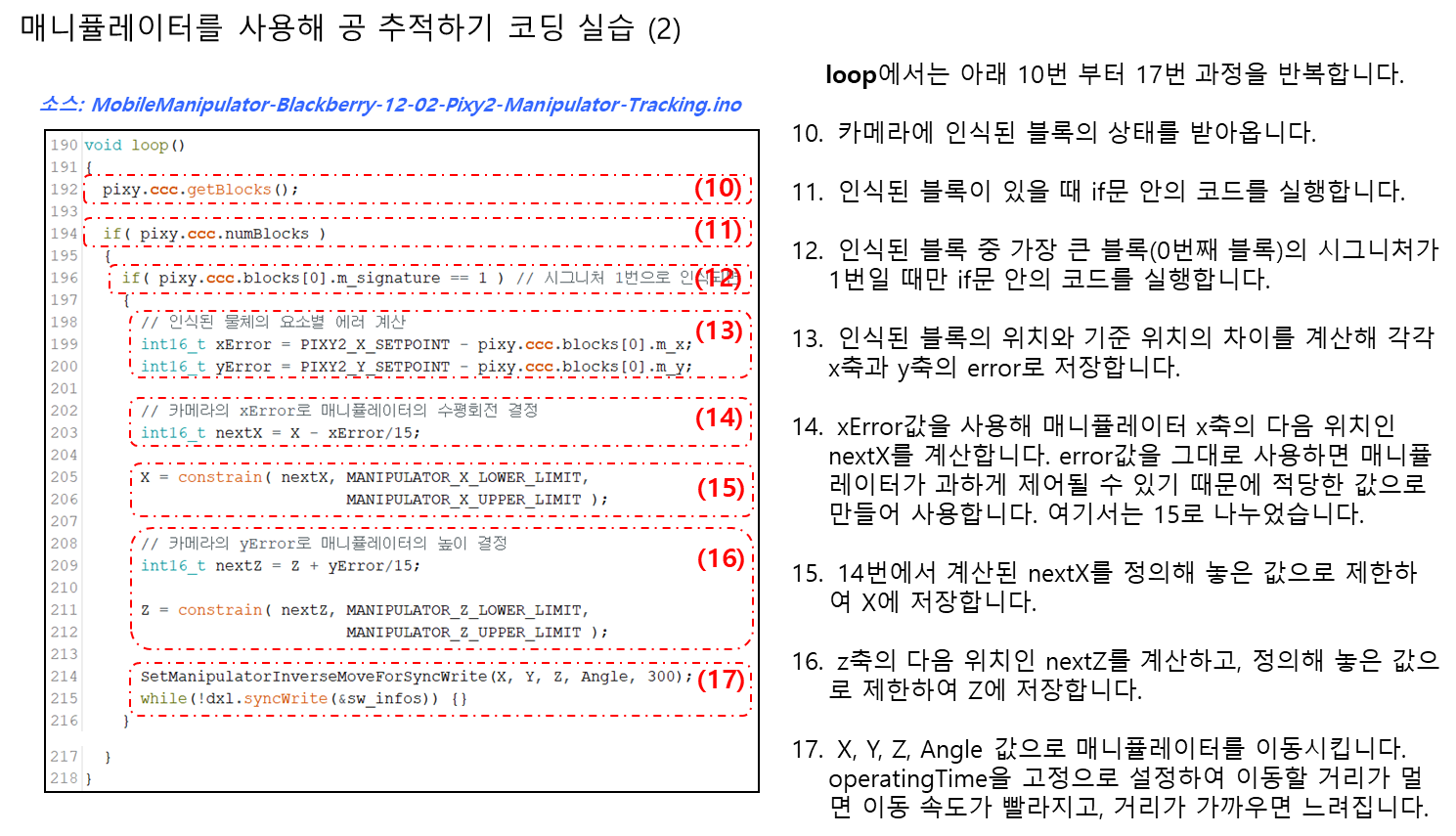
  pixy.ccc.getBlocks();

  if( pixy.ccc.numBlocks )
  {
    if( pixy.ccc.blocks[0].m_signature == 1 ) // 시그니처 1번으로 인식되면
    {
      // 인식된 물체의 요소별 에러 계산
      int16_t xError = PIXY2_X_SETPOINT - pixy.ccc.blocks[0].m_x;
      int16_t yError = PIXY2_Y_SETPOINT - pixy.ccc.blocks[0].m_y;

      // 카메라의 xError로 매니퓰레이터의 수평회전 결정
      int16_t nextX = X - xError/15;

      X = constrain( nextX, MANIPULATOR_X_LOWER_LIMIT,
                            MANIPULATOR_X_UPPER_LIMIT );

      // 카메라의 yError로 매니퓰레이터의 높이 결정
      int16_t nextZ = Z + yError/15;

      Z = constrain( nextZ, MANIPULATOR_Z_LOWER_LIMIT,
                            MANIPULATOR_Z_UPPER_LIMIT );

      SetManipulatorInverseMoveForSyncWrite(X, Y, Z, Angle, 300);
      while(!dxl.syncWrite(&sw_infos)) {}
    }
  }
}

/*
 * ARM_DXL_IDS 배열에 있는 아이디의 모터들이 모두 통신 가능한지
 * 확인하는 함수. 모두 통신 가능하면 true, 아니면 false를 반환
 */
bool FindManipulatorServos() {
  uint8_t ids_pinged[10] = {0,};
  bool is_each_motor_found = true;
  if (uint8_t count_pinged = dxl.ping(DXL_BROADCAST_ID, ids_pinged,
    sizeof(ids_pinged)/sizeof(ids_pinged[0]), 100)) {
    if (count_pinged >= sizeof(ARM_DXL_IDS)/sizeof(uint8_t)) {
      uint8_t arm_dxl_ids_idx = 0;
      uint8_t ids_pinged_idx = 0;
      while(1) {
        if (ARM_DXL_IDS[arm_dxl_ids_idx]
            == ids_pinged[ids_pinged_idx++]) {
          arm_dxl_ids_idx ++;

          if (arm_dxl_ids_idx
              == sizeof(ARM_DXL_IDS)/sizeof(uint8_t)) {
            // 찾으려는 모터를 모두 찾은 경우
            break;
          }
        } else {
          if (ids_pinged_idx == count_pinged) {
             // 통신가능한 모터가 더이상 없는 경우
             is_each_motor_found = false;
             break;
          }
        }
      }

      if (!is_each_motor_found) {
        Serial.print("Motor IDs does not match : ");
        Serial.println(dxl.getLastLibErrCode());
      }
    } else {
      Serial.print("Motor count does not match : ");
      Serial.println(dxl.getLastLibErrCode());
      is_each_motor_found = false;
    }
  } else{
    Serial.print("Broadcast returned no items : ");
    Serial.println(dxl.getLastLibErrCode());
    is_each_motor_found = false;
  }
  return is_each_motor_found;
}

/*
 * 각도를 입력받아 모터의 위치 값을 반환하는 함수
 * argument :
 *    angle : 모터의 목표 각도
 * return :
 *    대응하는 모터의 목표 위치 값. -1은 변환 실패
 */
int32_t GetArmServoGoalPositionWithAngle(float angle) {
  if (!isnan(angle)) {
    // 입력받은 angle 값을 -180~180 범위 내의 값으로 제한하고
    // 0~4095 범위로 매핑
    return (int32_t)map(constrain((int32_t)angle, -180, 180),
                        -180, 180, 0, 4095);
  } else {
    return (int32_t)-1;
  }
}

/*
 * 매니퓰레이터를 네 모터의 각도 값과 시간으로 제어를 준비하는 함수
 * argument :
 *    a1 : 5번 모터 각도
 *    a2 : 6번 모터 각도
 *    a3 : 7번 모터 각도
 *    a4 : 8번 모터 각도
 *    operatingTime : 매니퓰레이터 동작이 완료되기까지 소요될 시간
 */
void SetManipulatorForwardMoveForSyncWrite( float a1,
                                            float a2,
                                            float a3,
                                            float a4,
                                            int32_t operatingTime) {
  int32_t motor1GoalPosition = GetArmServoGoalPositionWithAngle( a1 );
  int32_t motor2GoalPosition = GetArmServoGoalPositionWithAngle( a2 );
  int32_t motor3GoalPosition = GetArmServoGoalPositionWithAngle( a3 );
  int32_t motor4GoalPosition = GetArmServoGoalPositionWithAngle( a4 );

  if (motor1GoalPosition != -1) {
    sw_data[0].goal_position = motor1GoalPosition;
    sw_data[0].profile_velocity = operatingTime;
  }
  if (motor2GoalPosition != -1) {
    sw_data[1].goal_position = motor2GoalPosition;
    sw_data[1].profile_velocity = operatingTime;
  }
  if (motor3GoalPosition != -1) {
    sw_data[2].goal_position = motor3GoalPosition;
    sw_data[2].profile_velocity = operatingTime;
  }
  if (motor4GoalPosition != -1) {
    sw_data[3].goal_position = motor4GoalPosition;
    sw_data[3].profile_velocity = operatingTime;
  }

  sw_infos.is_info_changed = true;
}

/*
 * 그리퍼의 위치와 그리퍼의 피치 각도로 4-DOF 매니퓰레이터를 제어하는 함수
 * params :
 *    x : 그리퍼 좌우 위치(mm)
 *    y : 그리퍼 전후 위치(mm)
 *    z : 그리퍼 높이(mm)
 *    angle : 그리퍼 피치 각도(degree)
 *    operatingTime : 매니퓰레이터 동작이 완료되기까지 소요될 시간
 */
void SetManipulatorInverseMoveForSyncWrite( int16_t x, int16_t y, int16_t z,
                                            int16_t angle, int32_t operatingTime ) {
  int16_t zFromMotor2 = z - d; // 계산의 편의를 위해 2번 모터 관절과 지면 사이의 거리를
                               // 무시한 z축(위/아래) 거리
  // 매니퓰레이터를 측면에서 봤을 때 전진 거리 yd
  float yd = sqrt((int32_t)x*x + (int32_t)y*y)*(y/abs(y));
  // 매니퓰레이터를 측면에서 봤을 때 2번째 링크가 끝나는 점의 위치 (y2, z2)
  float y2 = yd - L3*cos(DTR(angle));
  float z2 = zFromMotor2 - L3*sin(DTR(angle));

  // 세타1을 구하기 위해 사용되는 변수
  float k1 = L1 + L2*(y2*y2 + z2*z2 - L1*L1 - L2*L2)/(2*L1*L2);
  float k2 = L2*-1*sqrt(1 - pow((y2*y2 + z2*z2 - L1*L1 - L2*L2)/(2*L1*L2), 2));
  float theta1 = 0, theta2 = 0, theta3 = 0, theta4 = 0; // 모터별 세타 변수

  theta1 = RTD(atan2(y, x)); // atan2는 -pi~pi 범위로 결과를 반환 함
  theta2 = RTD(atan2(z2, y2)) - RTD(atan2(k2, k1));
  theta3 = RTD(atan2(-1*sqrt(1 - pow((y2*y2 + z2*z2 - L1*L1 - L2*L2)/(2*L1*L2), 2)),
                     (y2*y2 + z2*z2 - L1*L1 - L2*L2)/(2*L1*L2)));
  theta4 = angle - theta2 - theta3;

  float a1 = 90 - theta1; // 세타 값을 모터 제어를 위한 각도로 변환
  if (a1 > 180) // 범위를 -180~180으로 변환
    a1 -= 360;
  float a2 = -90 + theta2;
  if (a2 < -180)
    a2 += 360;
  float a3 = theta3;
  float a4 = theta4;

  // 계산된 모터 각도로 매니퓰레이터 동작 준비
  SetManipulatorForwardMoveForSyncWrite( a1, a2, a3, a4, operatingTime);

  Serial.println("Result");
  Serial.print("    theta1 = ");
  Serial.println(theta1);
  Serial.print("    theta2 = ");
  Serial.println(theta2);
  Serial.print("    theta3 = ");
  Serial.println(theta3);
  Serial.print("    theta4 = ");
  Serial.println(theta4);
  Serial.println();

  Serial.println("Result motor angle");
  Serial.print("    m1angle = ");
  Serial.println(a1);
  Serial.print("    m2angle = ");
  Serial.println(a2);
  Serial.print("    m3angle = ");
  Serial.println(a3);
  Serial.print("    m4angle = ");
  Serial.println(a4);
}
728x90
728x90
'소프트웨어 > Arduino' 카테고리의 다른 글
| 비전인식 물체 추적 (모바일베이스 활용) (0) | 2026.05.12 |
|---|---|
| AGV2 이동 알고리즘 (0) | 2026.05.07 |
| 카메라 비전과 인식률 개선 (0) | 2026.05.05 |
| 관성 측정 장치 (IMU, Inertial Measurement Unit)를 사용한 각도 측정 실습 (0) | 2026.04.24 |
| 종합 응용 미션 - 장애물이 없는 길을 찾아서 종이컵 실어오기 (0) | 2026.04.22 |